tidyOrg
Every Salesforce org. One desktop tool.
Copy real records into a sandbox. See what runs when a record is saved. Find out why a save failed. Check a merge request before you approve it. tidyOrg runs on your computer, reads any org and writes only into sandboxes.
30 days free, then from €79 / month per user.
Windows and macOS · Your org data stays on your computer · Writes only into sandboxes · Undo for every write
The same Salesforce jobs, every week, in every org.
A consultant works in many client orgs. An in-house team has production, a few sandboxes and a git repository. The jobs that come back are the same:
- The sandbox has no useful data, so testing one real case means hours of export and import.
- A save fails, and the reason is somewhere in a long debug log.
- A merge request removes a picklist value that a flow or an Apex class still uses.
- Release day lives in someone's head: which branch is up to date, which validation passed, what must be deleted by hand.
- The org pays for licences nobody uses.
- Salesforce retires a login method or an API version, and nobody knows which integration depends on it.
Teams handle this with spreadsheets, scripts and several separate tools. tidyOrg puts these jobs into one desktop app that you control.
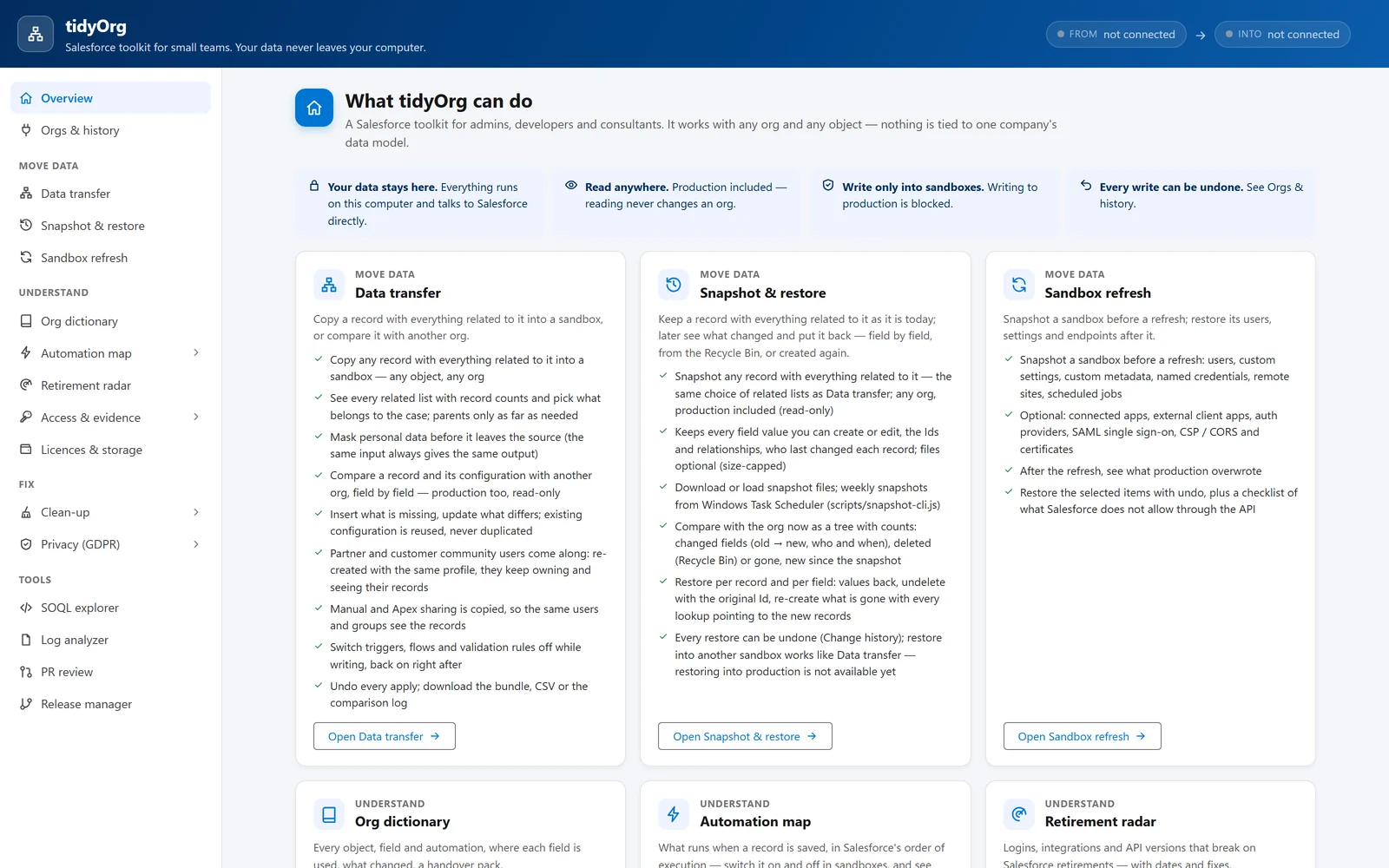
What tidyOrg does
Four groups of modules. Every module works with any org and any object.
/01Move data
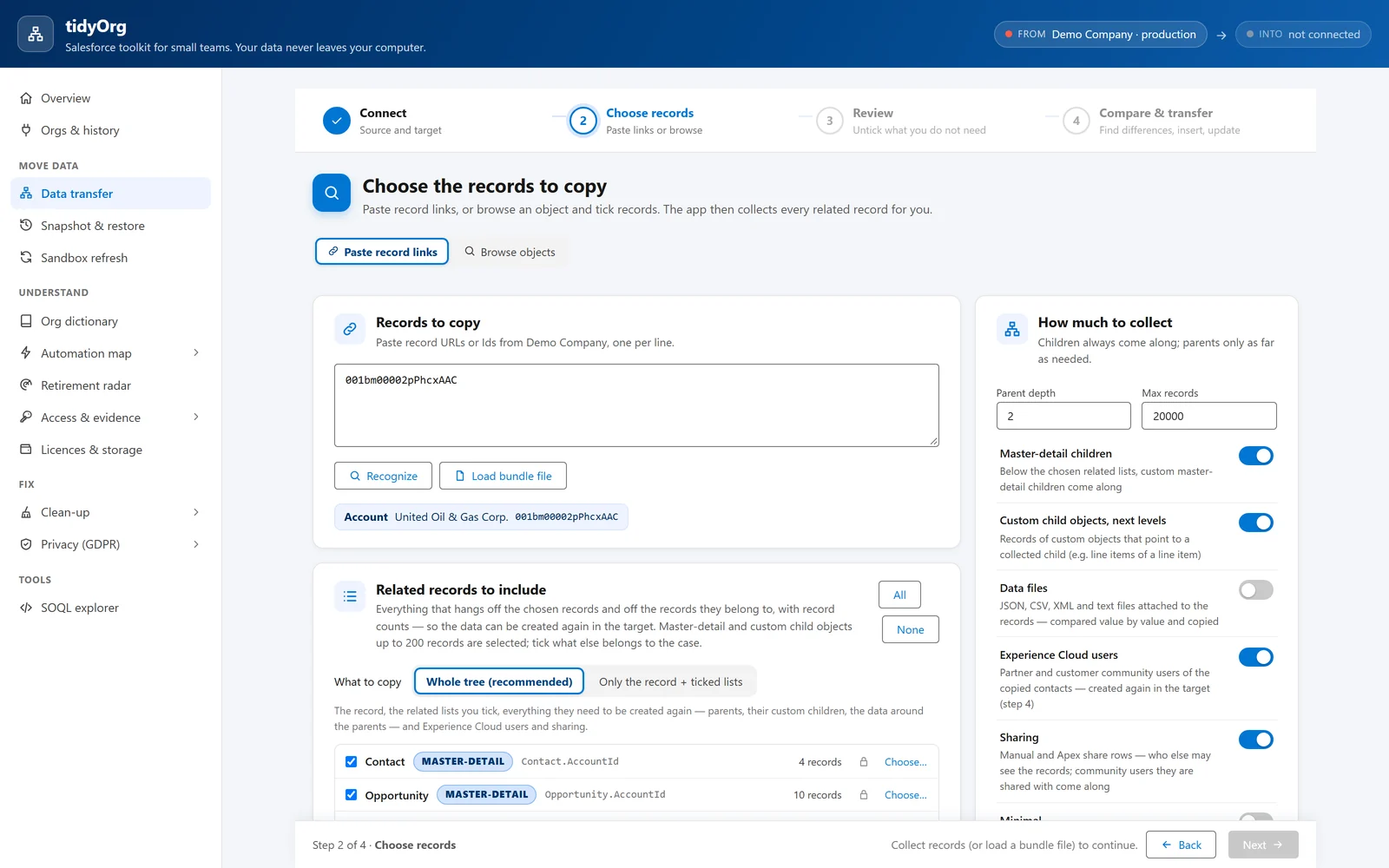
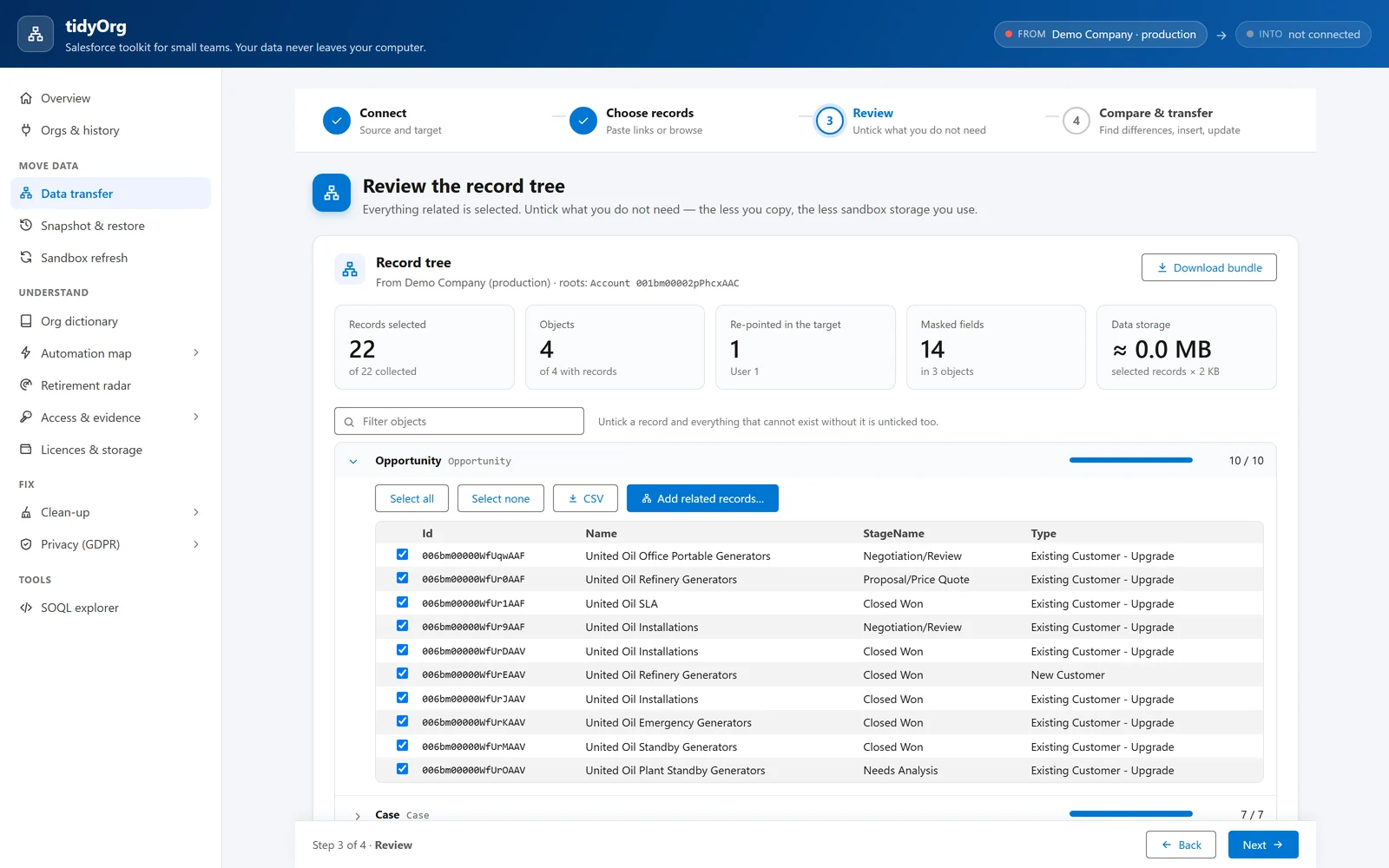
Data transfer
Pick a record, such as an account, an opportunity or a case. tidyOrg collects what belongs to it: related records, the parents it needs and attached data files. You see every related list with record counts and tick what to copy. Before anything is written, it compares with the target, checks the size against the target's storage and masks personal data if you ask. Records go in parents first, with Ids remapped. Experience Cloud users and manual sharing come along.
Snapshot & restore
Keep a record tree as it is today. Later, see what changed and put it back: field by field, from the Recycle Bin, or created again. Snapshots can run on a schedule.
Sandbox refresh
Before a refresh, snapshot users, settings, custom metadata, named credentials, remote sites and scheduled jobs. After it, see what production overwrote and restore it. Secrets go on a re-enter checklist.
/02Understand
Org dictionary
Objects, fields and automation. Where a field is used, its change history, missing descriptions and a handover pack.
Automation map
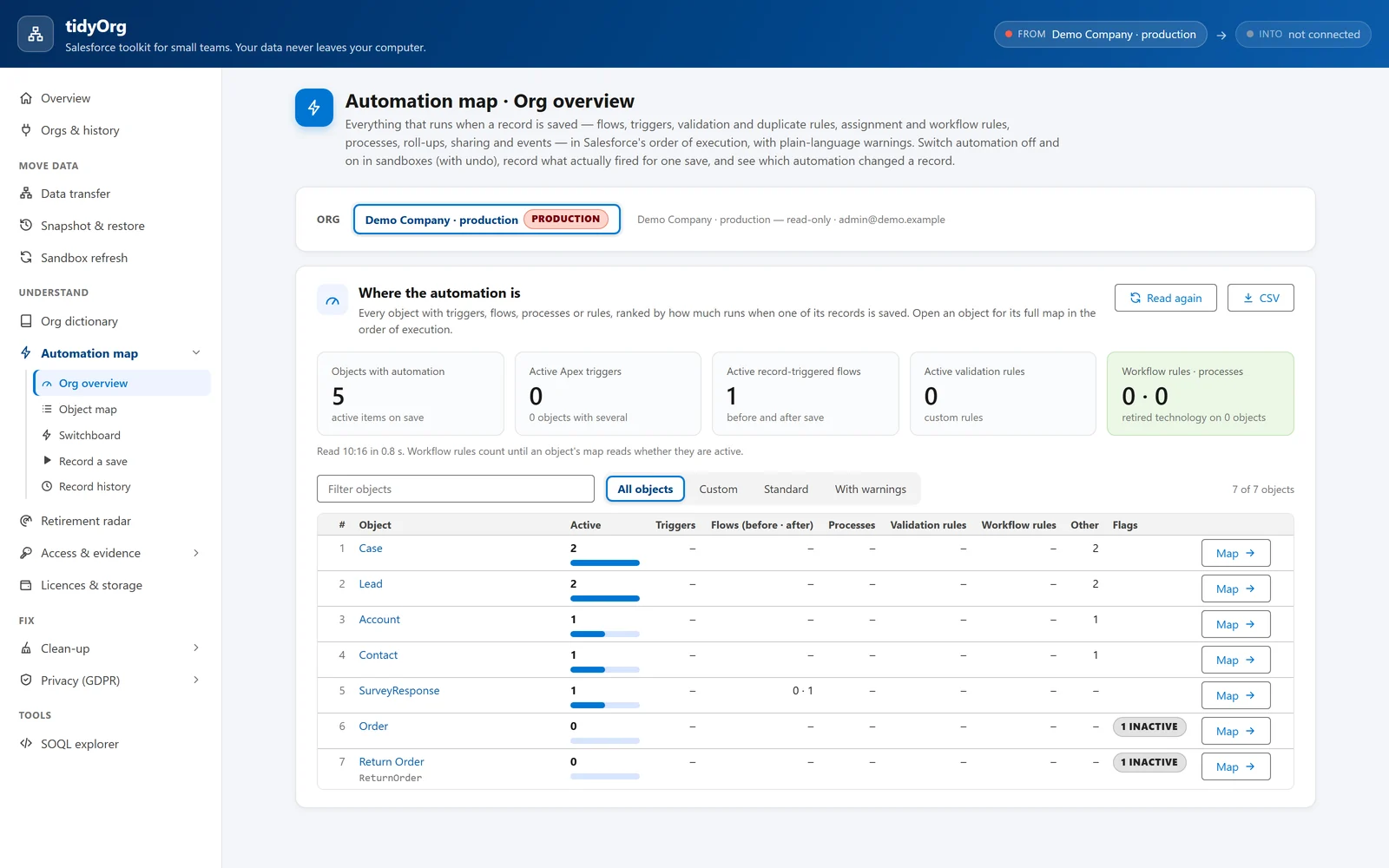
Everything that runs when a record is saved, in Salesforce's order of execution, with plain-language warnings. Record one save and read its debug log as a timeline. In sandboxes, switch validation rules and flows off and on. tidyOrg remembers what it switched off and reminds you to switch it back on.
Retirement radar
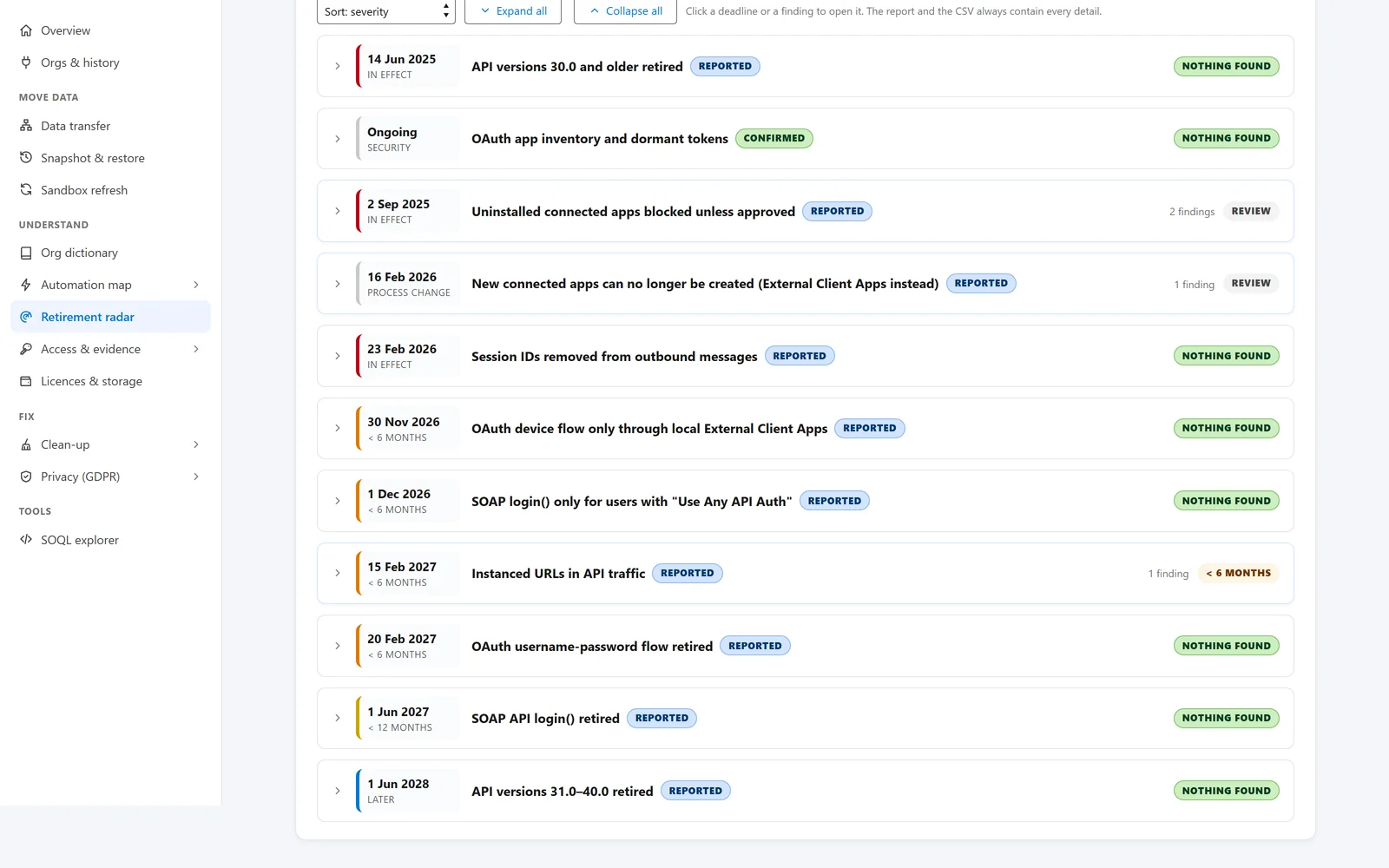
Finds logins, integrations, buttons and code that stop working when Salesforce retires a feature. Each finding names the component, where it is used and the fix. It also keeps an OAuth app register and builds a readiness report you can hand to a client or to management.
Access & evidence
Why a user can see a record. An access review, an audit trail archive and an NIS2 evidence pack.
Licences & storage
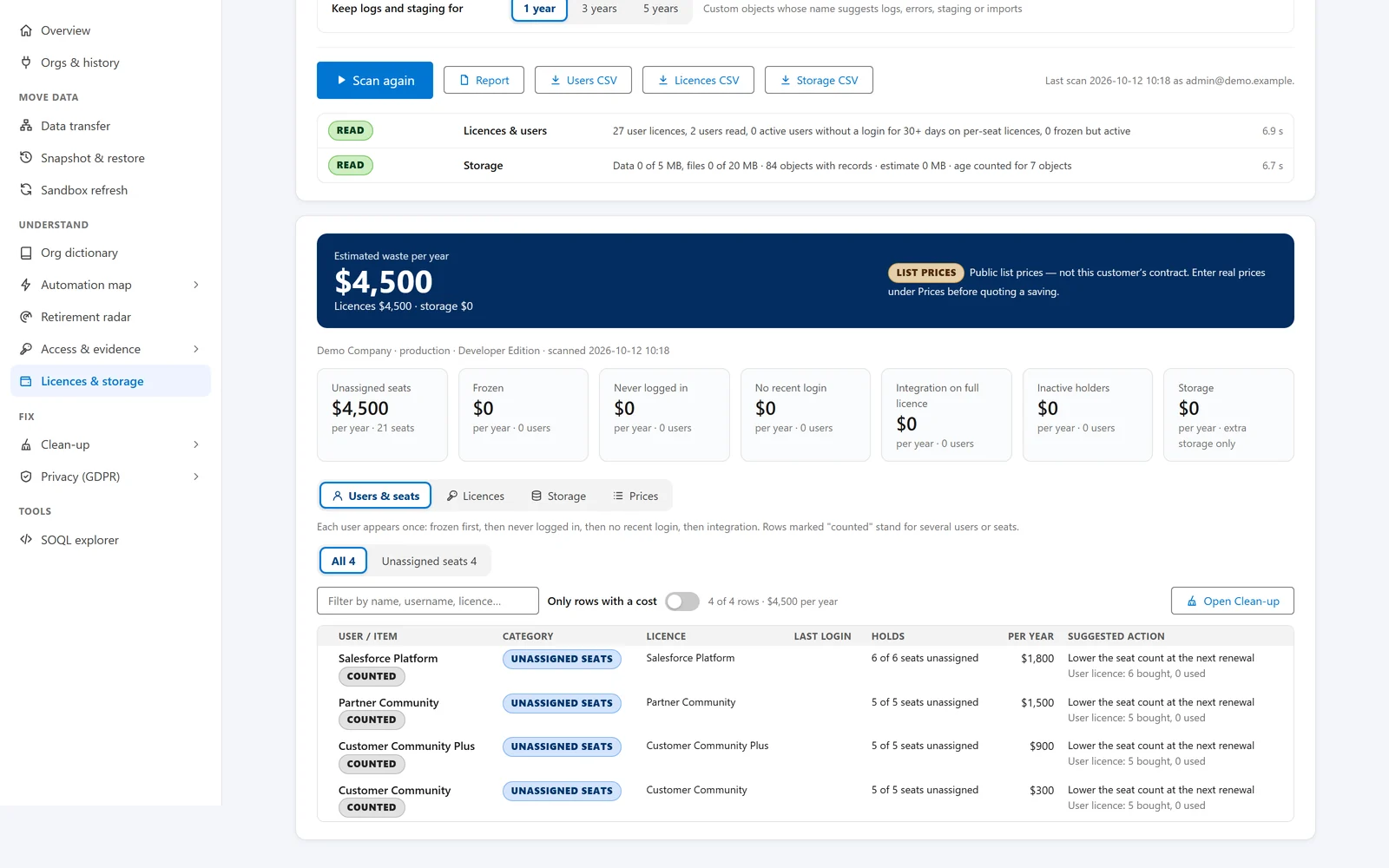
What the org pays for and does not use: idle, never-logged-in and frozen users, package seats on inactive users, integrations on a full licence, and storage that could go. It adds up to one yearly figure at your prices.
SOQL explorer
Write and run SOQL with autocomplete, on the Data or the Tooling API. Export results, open records, and edit cells in sandboxes with undo.
/03Fix
Clean-up
Unused fields, inactive users, unassigned permission sets and stale reports, all with undo. For Experience Cloud: licences, portal roles without users, and single-user accounts on the shared role. Changes run in sandboxes for now.
Privacy (GDPR)
Everything about one person in one place: export, anonymise or erase, with an evidence log. Plus a retention scan. Anonymise and erase run in sandboxes for now.
/04Deliver
Log analyzer
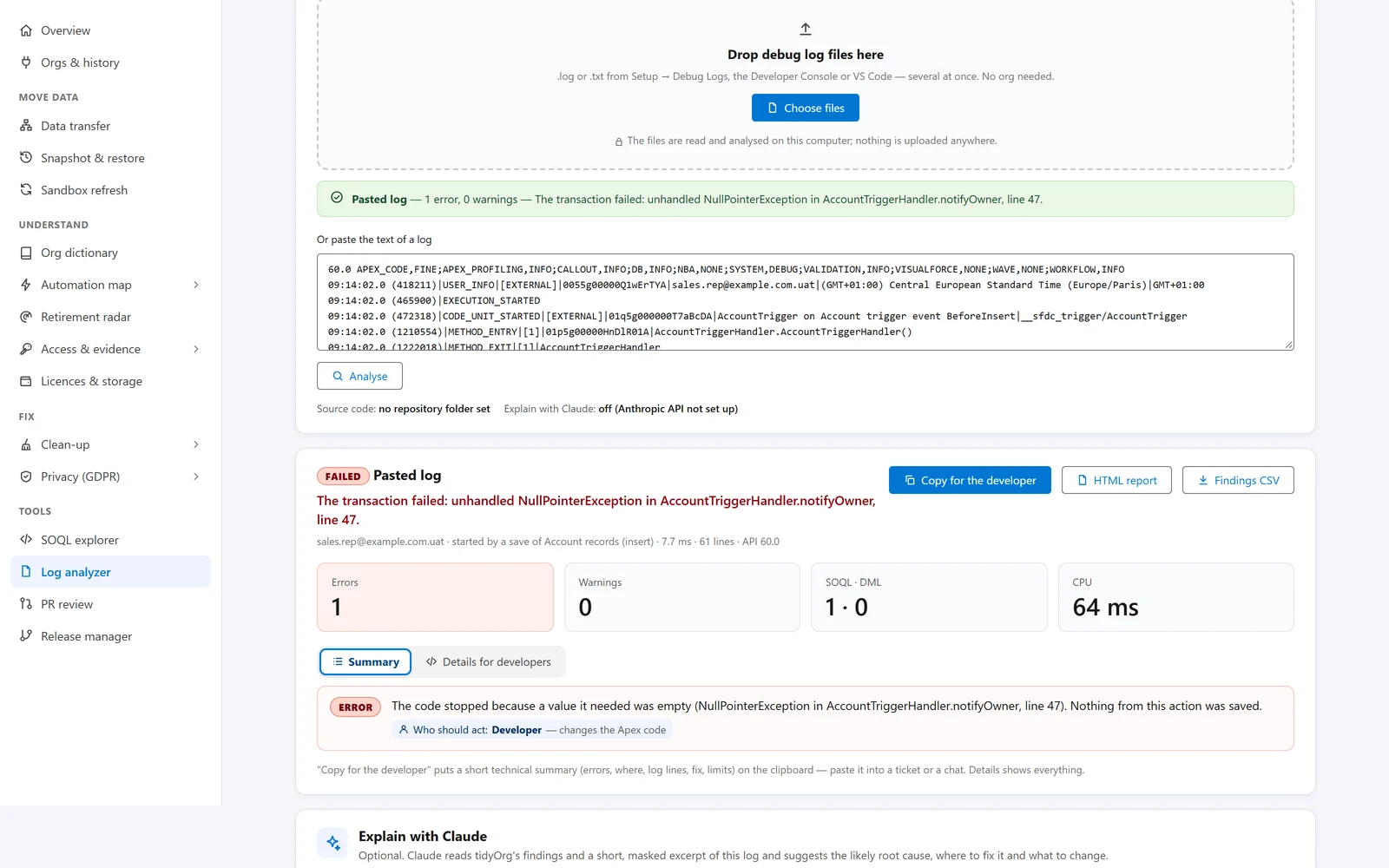
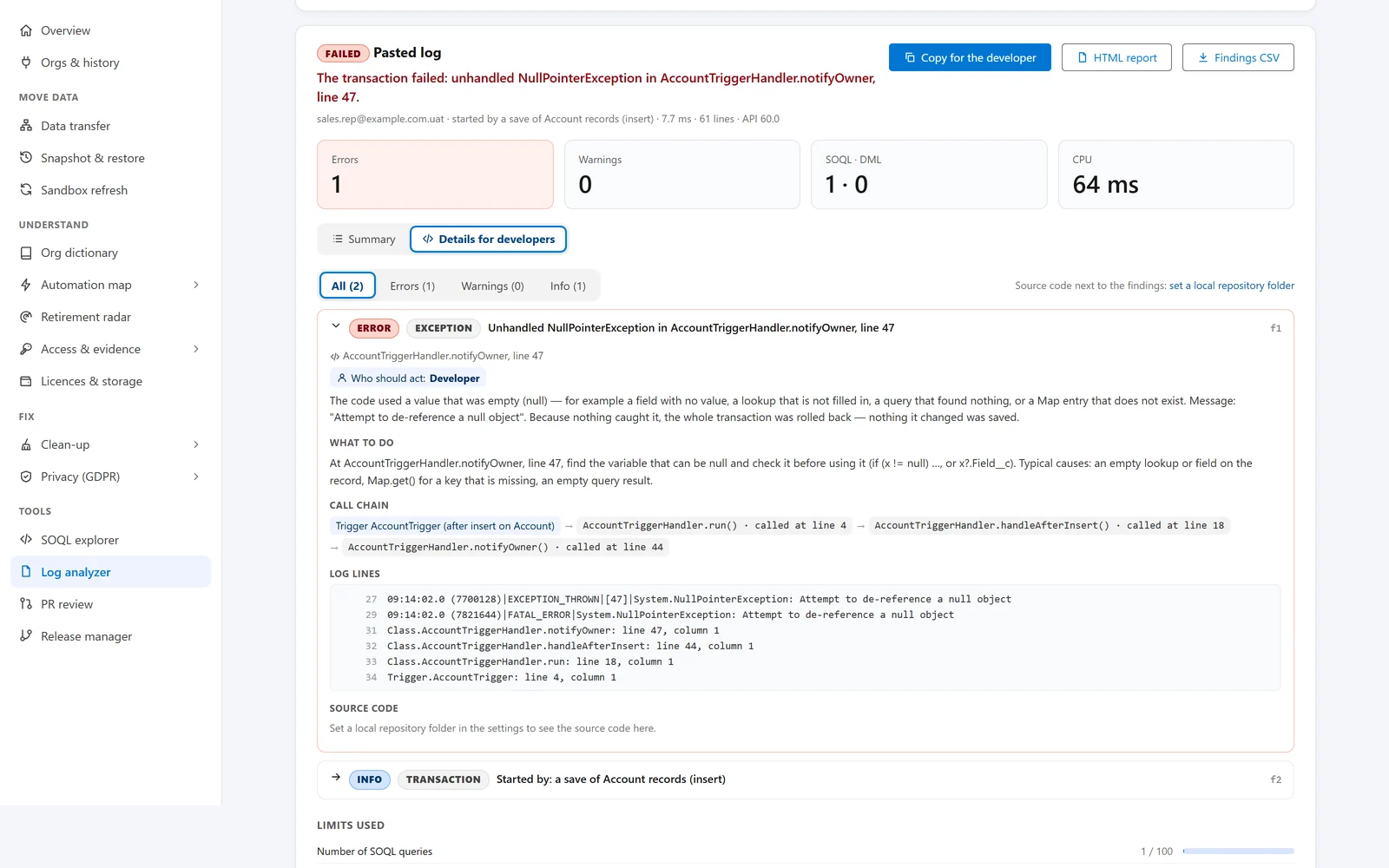
Why did a transaction fail? Load a debug log from an org, record a new one in a sandbox, or upload a log file. tidyOrg finds exceptions, validation rules and flow steps that stopped a save, limits that are exceeded or above 80 %, SOQL and DML in loops, recursion, failed callouts and truncated logs. Each finding has the place, the log lines behind it, a plain explanation, a fix and who should act. Operations staff read a short summary. Developers get the details, with the source lines next to each finding when you point tidyOrg at your local repository. Optional: "Explain with Claude", with your own AI account.
PR review
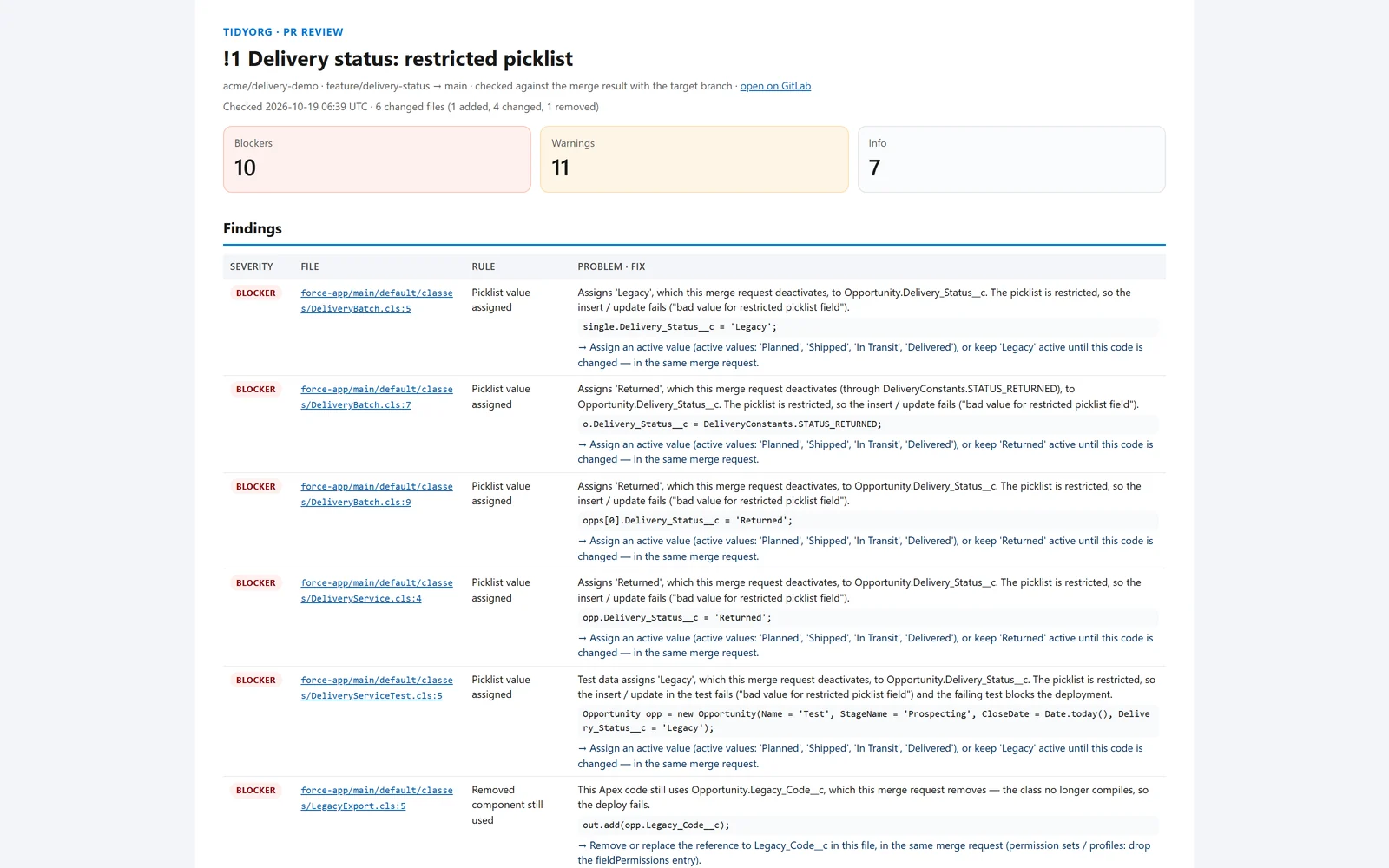
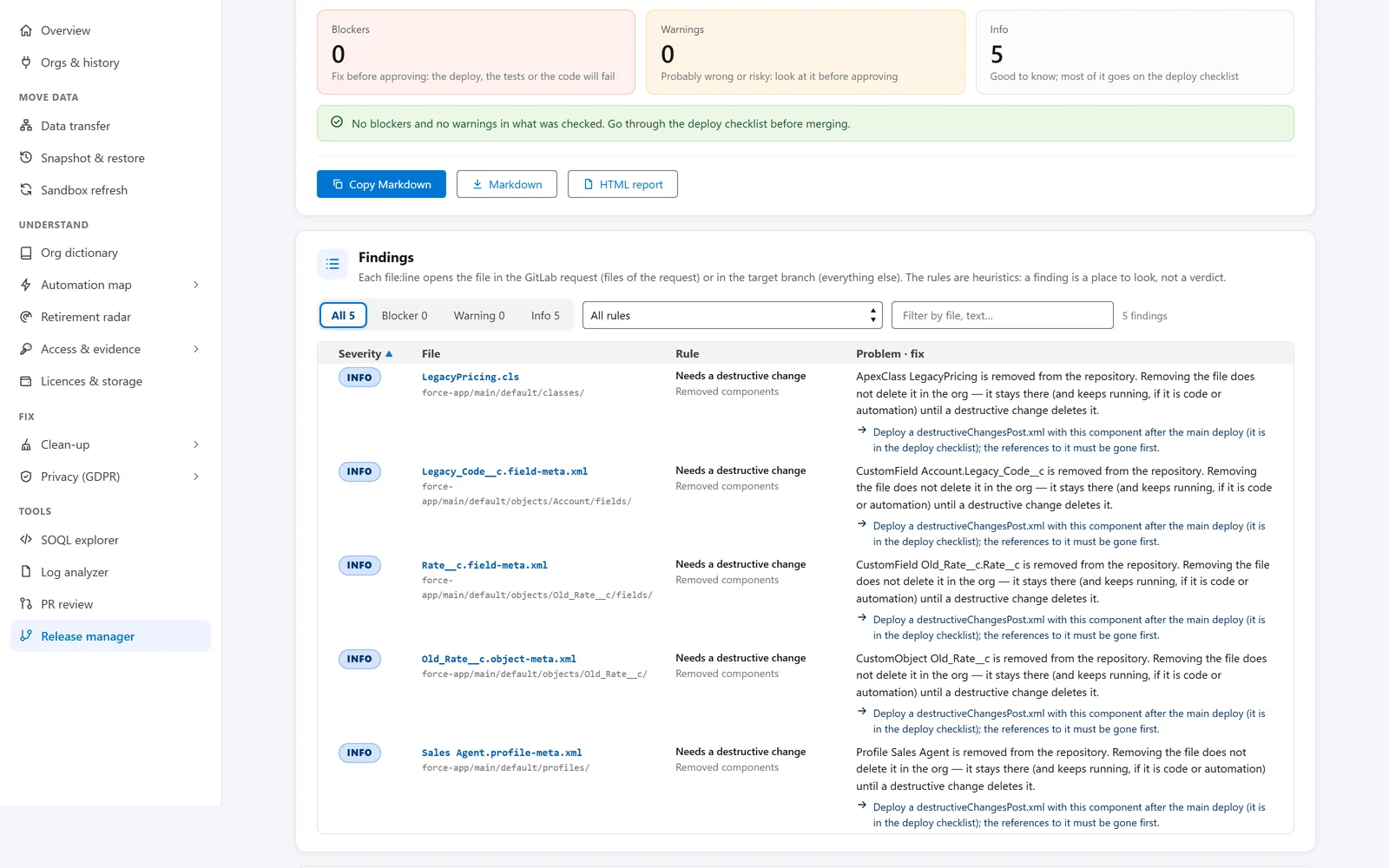
Check a GitLab merge request or a GitHub pull request before you approve it. The rules run on the merge result with the target branch. They find picklist values that code or flows still use, removed components that are still referenced, new fields without permissions, SOQL and DML in loops, SOQL injection, hard-coded Ids and endpoints, and more. Each finding has a file, a line and a fix, and you get a deploy checklist. It only reads: nothing is posted to GitLab or GitHub. Optionally, a read-only reference org shows how many records still use a removed value.
Release manager
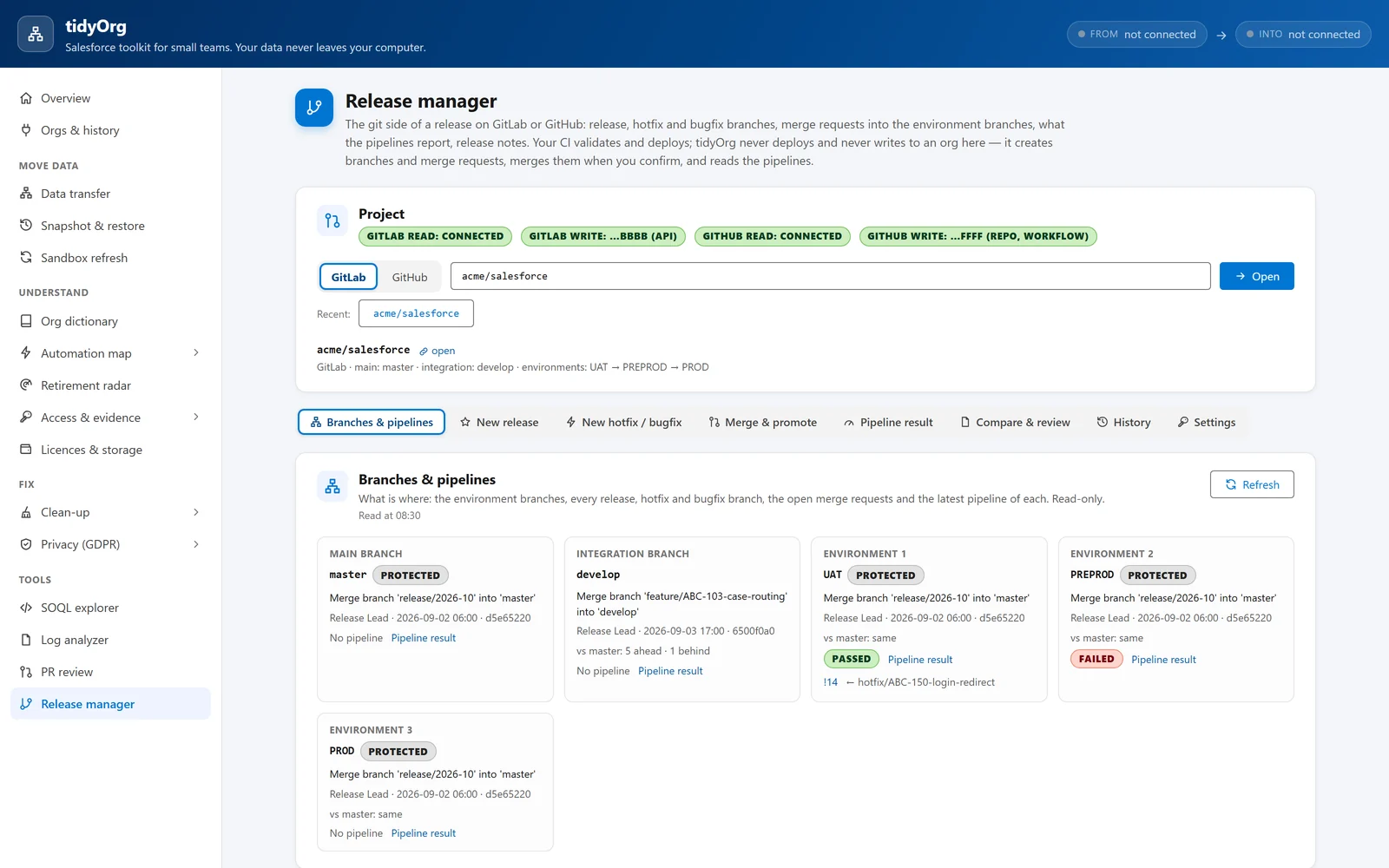
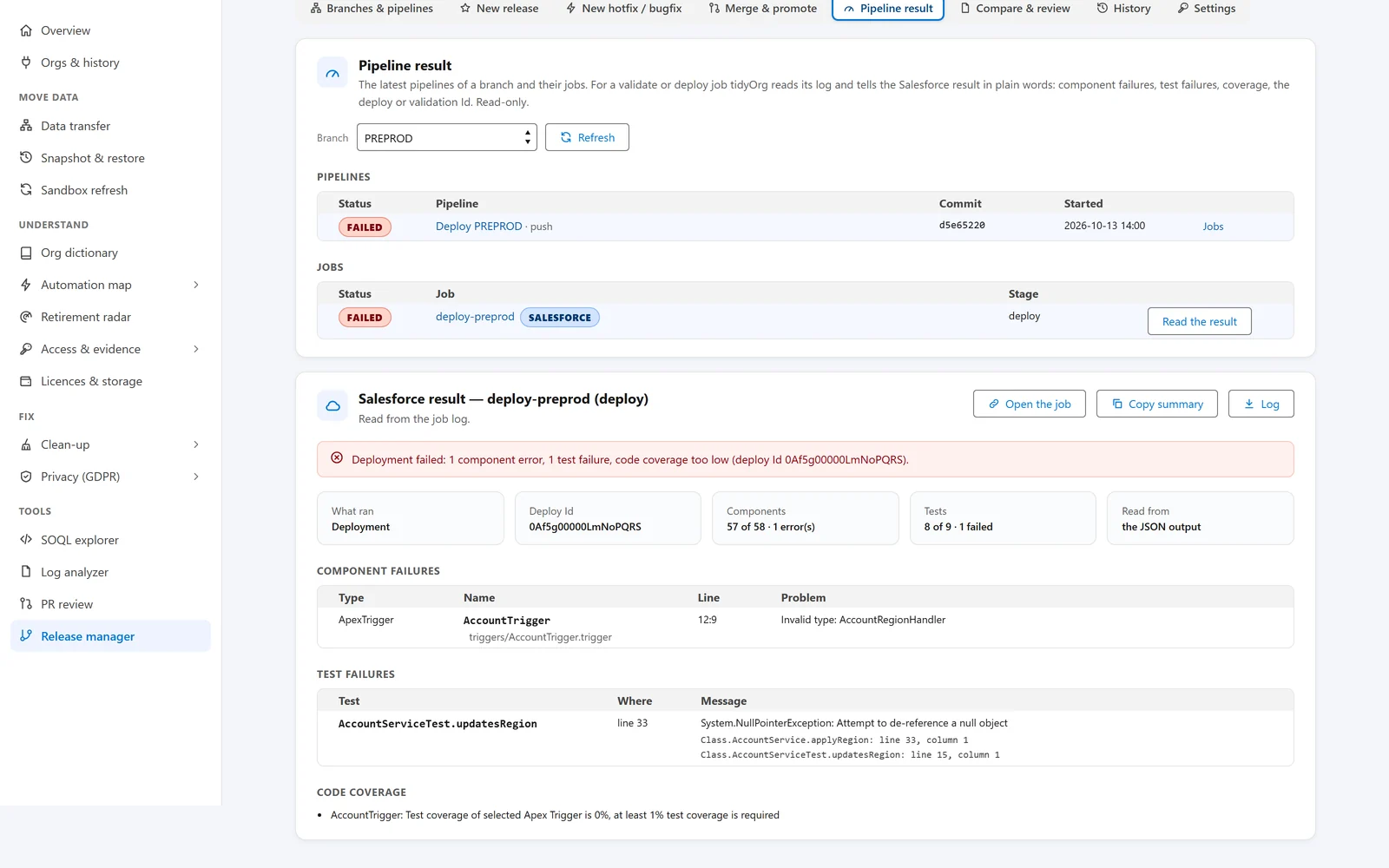
The git side of a release on GitLab or GitHub. A board of release, hotfix and bugfix branches with ahead/behind counts, open merge requests and the latest pipeline. Create branches with names you type. Open merge requests into your environment branches, and merge only after you confirm. Read the Salesforce result of a CI job in plain words. For release day: a checklist per release, a tests check before the production validation, the Quick Deploy window, what is missing where, and release notes with package.xml and destructiveChanges.xml. tidyOrg never deploys. Your CI does.
Safe by design
Local.
tidyOrg runs on your computer and talks to Salesforce directly. Your org data never passes through our servers. tidyOrg has no cloud of its own.
Reads anywhere, writes only into sandboxes.
Writing to production is blocked in the app's engine and again in its local proxy.
Undo for every write.
Each run keeps an undo journal on your computer. You can undo even after you close the app.
Nothing to install in Salesforce.
No managed package. Connect with the Salesforce CLI or a Salesforce login (OAuth). SSO and MFA work.
Secrets stay encrypted on your computer.
Refresh tokens, API keys and GitLab or GitHub tokens are stored encrypted (AES-256-GCM) in your data folder. The app only ever shows the last 4 characters of a key.
AI is optional.
"Explain with Claude" is off by default. When you turn it on, it uses your own account with Anthropic, Amazon Bedrock, Google Vertex AI or Microsoft Foundry. You see exactly what would be sent, with e-mail addresses, phone numbers, record Ids and names replaced by tokens. Nothing is sent until you click Send.
Careful with git.
PR review only reads. Release manager writes to GitLab or GitHub only with a separate write token, shows every step before it runs and keeps a journal. It never force-pushes and never deploys.
Signed apps.
The Windows installer and the portable app are code-signed by 3D&TECH LAB d.o.o. The macOS app is signed with an Apple Developer ID and notarized by Apple.
What tidyOrg does not do
- It does not deploy metadata. Your CI deploys, and the production deploy is a Quick Deploy you start in Salesforce.
- It does not write to production orgs. Clean-up and Privacy changes run in sandboxes for now.
- It does not switch Apex triggers off by itself. The API cannot do that without a deployment, so tidyOrg uses the bypass settings your code already reads.
- It is not built for very large data volumes yet. It writes through the REST API, 200 records per call. Bulk API 2.0 is not built yet.
- PR review rules are heuristics: a finding is a place to look, not a verdict. They read the Salesforce DX source format.
- The app is in English.
Who it's for
Consulting firms and freelancers.
You work in many client orgs. tidyOrg connects to all of them from your laptop, with nothing installed in the client's org and no client data sent to us. Copy a case into a sandbox, map the automation of an org you have just inherited, produce a licence or retirement readiness report, and check a merge request before it reaches UAT.
In-house Salesforce teams.
Admins, developers, dev leads and release managers who look after one org and its sandboxes. Seed sandboxes with real related records, find out why a save failed without reading the whole log, catch picklist and permission mistakes before a merge, and run release day from one checklist.
Pricing
30-day free trial
Register and we send you a licence key by e-mail. Use tidyOrg for 30 days. One free trial per person and computer.
tidyOrg Pro - from €79 / month
€79 per user per month, or €790 per user per year. Agency: €249 per month for up to 5 consultants.
The first 10 customers get 50 % off for as long as they subscribe.
Prices exclude VAT unless the checkout says otherwise. Payment and invoices are handled by Lemon Squeezy, our merchant of record. Cancel any time.
Frequently asked questions
Does my Salesforce data go to you?
No. tidyOrg runs on your computer and connects straight to Salesforce. Records, logs, connections and undo journals stay in a data folder on your computer. The only feature that sends anything outside your computer is the optional "Explain with Claude", and it sends to your own AI provider, not to us.
Does tidyOrg need internet access?
Yes, to reach Salesforce, and GitLab or GitHub if you use PR review or Release manager. It connects to them directly from your computer. The app's own server runs inside the app and listens only on your computer (127.0.0.1). The licence check sends only your licence key, your computer's name and a one-way hash of your computer's id (to allow one free trial per computer) to Lemon Squeezy, our reseller, when the app starts and once a day. If your network blocks it, tidyOrg keeps working for 14 days after the last successful check. Once a day the app also asks GitHub whether a new version exists; nothing about you or your orgs is sent.
Our laptops are locked down. Can we still use it?
Often, yes. The Windows installer installs for your user only and needs no admin rights. The portable version is a single file that starts without installing, for computers where installing programs is not allowed. Both are code-signed by 3D&TECH LAB d.o.o. The Salesforce CLI is optional: you can log in with a Salesforce login (OAuth) instead. PR review and Release manager need Git 2.31 or later.
Can tidyOrg change our production org?
No. It reads production but writes only into sandboxes. Writing to production is blocked in the app itself.
How does undo work?
Every run that writes keeps an undo journal on your computer. Under Orgs & history you can undo an earlier change, also after you have closed the app. Undo restores updated fields and deletes inserted records, children first. Two limits come from the platforms themselves: Salesforce never deletes users, so undo deactivates them, and a git merge cannot be undone, so you revert it with a new merge request.
Do I need to install anything in Salesforce?
No package. tidyOrg connects through the Salesforce CLI or a Salesforce login (OAuth). For OAuth, an admin sets up an External Client App once per org. The app shows the steps.
Is the AI part required? What does it send?
No. "Explain with Claude" in Log analyzer is optional and off by default. You choose the provider (Anthropic API, Amazon Bedrock, Google Vertex AI or Microsoft Foundry) and use your own account, billed by that provider. Before anything is sent, you see the exact text: tidyOrg's findings and a short excerpt of the log, with e-mail addresses, phone numbers, record Ids, IBANs, URL parameters and person names replaced by tokens. Only "Send" sends it.
Which GitLab or GitHub tokens does it need, and where are they kept?
PR review needs a read token: on GitLab with the scopes read_api and read_repository, on GitHub a fine-grained token with Pull requests: Read and Contents: Read. Release manager needs a separate write token for branches and merge requests; without one it only reads. Tokens are stored encrypted on your computer and handed to git per command, never written into the git config or a URL. Self-managed GitLab and GitHub Enterprise Server work too.
Does it run on Mac and Windows?
Yes. Windows (installer or portable) and macOS (signed and notarized). It works with any Salesforce org that has API access.
What happens after the 30-day trial?
To keep using tidyOrg, buy Pro, monthly or yearly. Your connections, snapshots and undo journals are files in your data folder on your computer, and they stay there. When the trial ends, tidyOrg shows the licence page instead of the modules until you enter a Pro key. Nothing is deleted.
Can I cancel any time?
Yes. You can cancel your subscription whenever you like in the billing portal at 3dtechlab.lemonsqueezy.com/billing (you sign in with your e-mail address). Pro stays active until the end of the period you have paid for, and you are not charged again.
Who sends the invoice, and how is VAT handled?
Lemon Squeezy is our merchant of record. It takes the payment, charges VAT where it applies and sends you the receipt and the invoice. Prices on this page exclude VAT unless the checkout says otherwise. A company can enter its VAT number at checkout, or later in the billing portal.
Ready for a tidy org?
Try it in your own sandbox for 30 days, or book a short demo and we'll show it on a demo org.
tidyOrg is made by 3D&TECH LAB d.o.o., Croatia · martin@3dtechlab.hr
Salesforce is a trademark of Salesforce, Inc. tidyOrg is not made, endorsed or supported by Salesforce. Other product names are trademarks of their owners.